Posts

Showing posts with the label Web Development

How to add email notification to a website using Mailchimp - EHB

Image
What is an Email Notification? Email notification: is a mail sent to inform your website subscribers about changes or updates to a website or service, like new products, features, scheduled website maintenance, etc. Add the 'Email Subscription' feature to any website or blog using 'Mailchimp' without coding skills. Go to the Mailchimp website and create a free account. Go to Audience > Signup Forms Now you will see a screen like:- This article will tell you how to add a pop-up Subscriber form to your website. Click on the "Subscriber pop-up" option. Now you can customize your form to your heart's content. When you are done doing that, go to the next step. Click on connect site. Now enter your website's URL and click on Get Started. By doing it, you will get a Javascript code. Add the Javascript code to your website's <head> tag Now click on Check Connection. If it is successful, then click on Save Changes. And ...

How to send 'Forgot Password' mail using Node.js and Gmail API - EHB

Image
There are many ways to achieve this task, but here we will be using Gmail API and Node.js. Because almost everyone has a Gmail account, it will be easy for everyone to implement it. Here we will be using OAuth2 and nodemailer npm package. To create a program that sends mail to users, you have to go through the following steps: Step 1:-Create a folder named email-notification, and in this, create the "app.js" file. Step 2:- Initialize npm using the "npm init -y" command. Step 3:- Install the "nodemailer" and "googleapis" npm packages. Use the " npm i nodemailer googleapis " command in the terminal. Step 4:- Go to " https://console.cloud.google.com/ " If you have a google account, you will automatically log in when you visit this website. Step 5:- Create a new project. Click on where "My First Project" is written and then " new project " you can also search for " create a project ...

API | Create a Fully Working API with Node.js and Express - EHB

Image
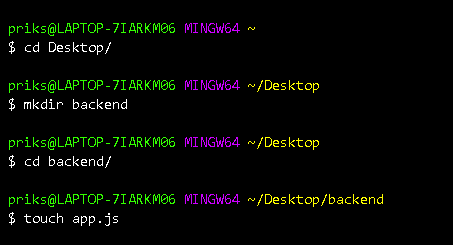
In this post I am going to show you how you can create an API to get some data with the help of Node.js and Express. Here we are going to create a simple API that sends the word "Hello". Let's get started now that you know what we are going to do. Make sure you have installed and setup Node.js on your computer. If you haven't installed it yet, then you can download it here . We will be using Hyper Terminal in this post. You can use any terminal you are familiar with. Step 1: Create a folder called "backend" In the first step, we are simply going to create a folder named "backend". You can name it whatever you want. You can create a folder in two ways: Making Use of the Mouse Use a mouse or trackpad and "Right-Click > New > Folder" . Making Use of Terminal Open the Terminal and use the cd command to go to the location where you want to create the folder. For simplicity's sake, I am going to create the fol...

5xx Error | Server Error in Google Search Console Sloution

In this post, I am going to tell you what Search console server error(5xx) is and how you can resolve it, So that you can index your blog or website on Google and expand your website's reach all over the globe. So without further ado, let's get started. What is a server error (5xx)? Let's first understand what the server error means. The server error usually starts with a number 5, like 500, 503, etc. The server error means that the server couldn't fulfil the request because it encountered an unexpected condition. Server errors usually come from the server on which our website is hosted. In our case, it is Blogger. Why is Google Search Console giving a 5xx error? If Google Search Console is giving a 5xx error, it means that the Googlebot couldn't access your URL, the request timed out, or your site was busy. The Googlebot was forced to abandon the crawling request. You didn't do anything wrong with it. It was a fault on the server side of the Blogger si...

Blogger | Add Google Analytics and See Real-Time Traffic Data

Image
Today, I will tell you how you can add Google Analytics to your blog post created on the Blogger site. In this post, I'll show you how to include Global Site Tag (gtag.js) in your blog's header section. For properly adding Google Analytics to your site, keep reading. Google Analytics is a powerful tool for collecting data related to your website, and more importantly, it is freely available. With the help of this tool, you can create content that is perfect for your visitors and increase your website traffic. It also helps you understand what content is driving traffic to your site. Moreover, it is from Google, so you can rest assured about your data's safety. Below is a graph showing Google Analytics data:  Here are the steps you need to take to add Google Analytics to your website: Steps to add Google Analytics to Blogger Step 1:- Create a Google Analytics account and open it. Making a Google Analytics account is easy. If you have a Gmail account , then ...

How to add Transparent textures in website background - EHB

In this post, I am going to tell you how you can add some lines or patterns to the background of your website. As an example, you can see that in WhatsApp, when you open a contact, there are some doodles in the background where messages are displayed. Here you will learn step by step how you can also add these types of lines or patterns to your website absolutely free. So keep reading. Many people use these "Transparent Textures" on their websites to make them more beautiful and appealing to the eye of the user. To add these transparent textures to your website, you only need to know some basic HTML and CSS. The "Transparent Textures" website will provide you with the CSS which you can add to the body tag of your HTML file. If you are ready, then let's see the steps now. Step 1: Go to " Transparent Textures " Step 2: Select your preferred texture. Step 3: Get the CSS On the left hand side, you will see an option like "3. Grab the CSS...